
How to Delete an Uncategorized Category in WordPress

You cannot remove the Uncategorized category, but you can rename it.


1. Log in to the WordPress dashboard.


2. From the Dashboard menu, go to Posts and click on Categories.
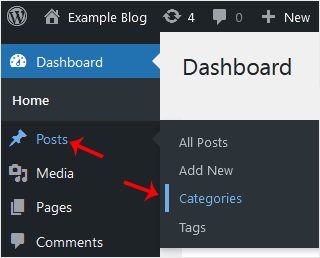
wp-dashboard-category-option.gif


3. Hover your mouse on the Uncategorized option and click on Quick Edit.
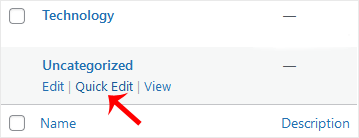
wp-uncategorized-category-remove.gif


4. Change its name and slug, and confirm with Update Category.
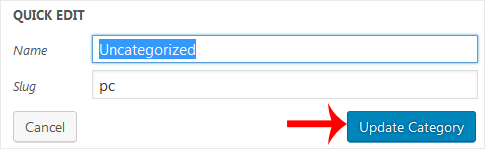
wp-uncategorized-category-update.gif

  • wordpress
  • 0 Utilisateurs l'ont trouvée utile
Cette réponse était-elle pertinente ?

Articles connexes

How to Install a WordPress Theme Manually

You can easily install a WordPress theme and activate it manually. Please, follow the steps below...

How to Install a WordPress Plugin

WordPress plugins are very useful. You can easily install a plugin from the WordPress...

How to Access the WordPress Admin Dashboard

WordPress is an easy to work with CMS software. To access a WordPress account, please follow...

How to Remove Sample Comments and Posts From WordPress

You get sample comments and posts in a fresh WordPress install. You can easily remove them in the...

How to Write and Publish Your First Blog Post in WordPress

Writing your first blog post is a fascinating thing. Follow the steps below to do so in...