
AfeesHost Ltd
  • 0 Coș de cumpărături
  • Acasă
  • Magazin
    • Răsfoiți tot
    • Web Hosting
    • WordPress Hosting
    • cPanel License
    • Reseller Hosting Linux
    • VPS
    • Dedicated Servers
    • SSL Certificates
    • CodeGuard
    • OpenXchange
    • SiteLock
    • Backup-ul site-ului
    • E-mail profesional
    • Protecție site
    • Servicii e-mail
    • Instrumente SEO
    • Înregistrare domeniu nou
    • Transfer domenii
  • Anunțuri
  • Biblioteca de cunoștințe
  • Starea sistemelor
  • Afiliere
  • Contact
  • Mai multe
  • Contul meu
    • Autentificare
    • Înregistrare
    • Ai uitat parola?
  1. Portal clienți
  2. Biblioteca de cunoștințe
  3. Plesk
  4. CloudLinux (Plesk)
  5. How to Enable or Disable PHP's allow_url_fopen Using CloudLinux Selector in Plesk

  Categorii

Backup
2
Backup/Restore
4
Cloudflare (cPanel)
9
CloudLinux (cPanel)
11
Control panel (Cpanel)
15
cPanel - Control Panel
26
cPanel WHM Server
1
Databases
11
Developer Corner Resources
2
DirectAdmin
48
DNS - Nameservers
6
Domain
15
Domain Management
10
E-Mail Service
4
Email
17
FTP
9
Installing a Control Panel
6
Mail Filters & SPAM
8
Mobile
11
Others
3
PayPal
7
Plesk
47
Security
1
Security
10
SiteWorx (Control Panel)
58
Softaculous
69
SolusVM
18
SSL
5
SSL Certificates
2
The Difference Between A Domain Name And Web Hosting
1
using ftp software to manage your content
3
Virtualizor
19
Which software and applications do AfeesHost's servers support?
4
WHM
18
WordPress
17

  Categorii

  Etichete cloud

blog CageFS Comodo SSL cpanel Create a Website DMARC domain name domain renewal expired domain file usage Google review Google warning ICANN Inode limit inodes Jupiter MALDET NIRA Node.js Python security Softaculous SSL Certificate subdomain verification whois wordpress wordpress plugins

  Asistență

Tichetele mele
Anunțuri
Biblioteca de cunoștințe
Fișiere
Starea sistemelor
Deschide Tichet

How to Enable or Disable PHP's allow_url_fopen Using CloudLinux Selector in Plesk Tipărire

  • 0


You can use CloudLinux Selector to enable or disable the allow_url_fopen directive in Plesk.


1. Log in to your Plesk account.

2. Click on the Pull icon in the right sidebar and choose PHP Selector.
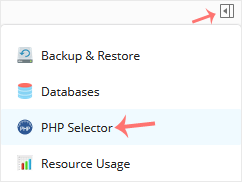
Plesk-CL-PHP-Selector-menu.gif


3. Click on the Options menu.

CL-options-menu.gif

Note: If the Options page shows an error related to the native PHP version, change it to a non-native version first.


4. For enabling allow_url_fopen, checkmark it. For disabling it, uncheck it.
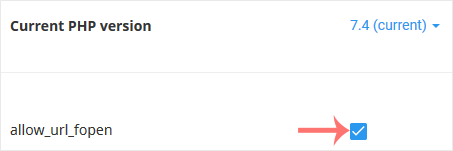
CL-fopen-enable-disable.gif


Răspunsul a fost util?

Articole similare

How to Increase PHP's post_max_size Value Using CloudLinux's Selector in Plesk   You can modify PHP post_max_size as per your needs using CloudLinux PHP Selector in Plesk.... How to Increase PHP's upload_max_filesize Value Using CloudLinux Selector in Plesk   You can modify PHP's upload_max_filesize as per your needs using CloudLinux's PHP Selector in... How to Enable or Disable PHP's display_errors via CloudLinux Selector in Plesk   Sometimes, we need to debug PHP. Hence, we need to enable display_errors or disable them for... How to Enable or Disable PHP Extensions Using the CloudLinux Selector in Plesk   You can use CloudLinux Selector to enable or disable available PHP extensions in Plesk.   1.... How to Increase or Decrease PHP Memory Limit via CloudLinux Selector in Plesk   You can modify PHP Memory Limit as per your needs using CloudLinux PHP Selector in Plesk....
« înapoi

  Etichete cloud

blog CageFS Comodo SSL cpanel Create a Website DMARC domain name domain renewal expired domain file usage Google review Google warning ICANN Inode limit inodes Jupiter MALDET NIRA Node.js Python security Softaculous SSL Certificate subdomain verification whois wordpress wordpress plugins

  Asistență

Tichetele mele
Anunțuri
Biblioteca de cunoștințe
Fișiere
Starea sistemelor
Deschide Tichet
  • Contact

Copyright © 2026 AfeesHost Ltd. Toate drepturile rezervate.


se încarcă...
se încarcă...
Limba
العربية
Azerbaijani
Català
中文
Hrvatski
Čeština
Dansk
Nederlands
English
Estonian
Persian
Français
Deutsch
עברית
Magyar
Italiano
Macedonian
Norwegian
Português
Português
Română
Русский
Español
Svenska
Türkçe
Українська

Alege moneda

₦ NGN
$ USD

Generare Parolă

Vă rugăm să introduceți un număr între 8 și 64 caractere pentru lungimea parolei
Changing your main domain name
IMPORTANT! What this change means
Duplicate Domain Names

Your new main domain name should not exist in this or any other AfeesHost Ltd Hosting account.

Automatic Updates

Your new main domain name should not exist in this or any other AfeesHost Ltd Hosting account.

Manual Updates Required
  • Any URL database references, contacts, mailing lists, SSL certificates, Softaculous App installations and their backups.
  • If your website is built with Website Builder, you will need to back up and restore the content manually.
